
Compart DocBridge® Suite

Automated omnichannel communication from input to output
As Compart sales and integration partner for Switzerland and Liechtenstein, we offer our customers future-proof solutions for automated omnichannel communication with the DocBridge® Suite. With Compart derDocBridge® Suite, we rely on scalable, high-performance and easily integrated software solutions for receiving, creating, processing, checking, validating and controlling as well as sending documents of all types on any communication channel - of course also in large amounts of data.
If you receive data and information in different formats (including as messenger messages or with attachments) and need to process them in a specific form in your business cases so that they can leave the company again in various languages and on constantly changing communication channels, then you will be impressed by the performance of the Compart DocBridge® Suite and the resulting process optimization. Speak to us so that we can evaluate and integrate the elements of the DocBridge® Suite that are relevant to your company.

With the Compart DocBridge® Suite, we connect the world between analog and digital communication for you - so that you will still be in the best connection with your customers tomorrow.
New generation document creation
The days of multiple document creation and processing per output channel and/or language are finally a thing of the past with the Compart DocBridge® Suite. With the DocBridge® Communication Suite DBCS, you can intuitively create modern documents based on the HTML5 standard - once for any output channel, in the required language and of course with an individual approach.
Once created, the documents can be used for all media, regardless of page format. You can easily use the integrated library of language logic rules, the defined business logic rules, the existing templates, images and text modules to create dynamic content.
Use the guided interactive functions and the integrated process design to ensure that the documents not only correspond to corporate styling, but also, in particular, to business plausibility and are therefore coherent. Employees are effortlessly guided through the creation of documents using workflows individually defined by you via the intuitive and form-based application. The result can hardly be valued in money: embarrassing miscommunication with customers is a thing of the past with the Guided Interactive function of the DocBridge® Communication Suite.
For particularly sensitive or business-critical documents, additional workflows can be used to trigger release mechanisms such as a dual control principle or authorization by the superior. And of course, in the final instance, you also ensure the relevant step of document delivery. The application can be used to trigger the downstream processes of document and output management, including follow-up rules in the event of non-delivery - of course individually depending on the business transaction and customer.

New generation document creation with the Compart DocBridge® Communication Suite not only represents the modern standard of full flexibility; but for unprecedented security and empowerment for employees.
The AI Assistant of the DocBridge® Communication Suite – your personal assistant
Business software is becoming increasingly complex and places ever higher demands on users, which is why knowledge and efficiency are crucial factors for the success of projects and companies. Finding answers quickly and learning new features often means researching documentation and interrupting the workflow.
What if you had an on-call expert as your assistant?
With the latest version of DocBridge® Communication Suite, this is now a reality. We're excited to introduce Compart AI Assistant - an integrated, intelligent expert that revolutionizes the way you create, manage and optimize your customer communications.
Your personal expert – answers at the touch of a button
The AI Assistant is a powerful new feature built right into the user interface. It's more than just a simple help file or chatbot; it is a context-sensitive tool that speeds up your workflow and increases your productivity.
The AI Assistant offers you immediate answers to your questions in the easiest way - without interrupting the workflow and searching for a long time in documentation. It processes your request and provides a clear, step-by-step response that comes directly from the official and version-specific product documentation. This means that the information is not only available quickly, but also precise and relevant to the software version you are using. This feature significantly reduces the learning curve and empowers all users to find solutions to their problems within seconds.
Massive optimization of migration projects – thanks to the support of AI
The AI Assistant reveals its full strength when it goes beyond answering questions and actively supports you in creating communication. A separate tab in the wizard is dedicated to AI-based generation and optimization of key resources. The assistant can help you create and optimize the building blocks of your communication - or build entire templates and create tagging templates.
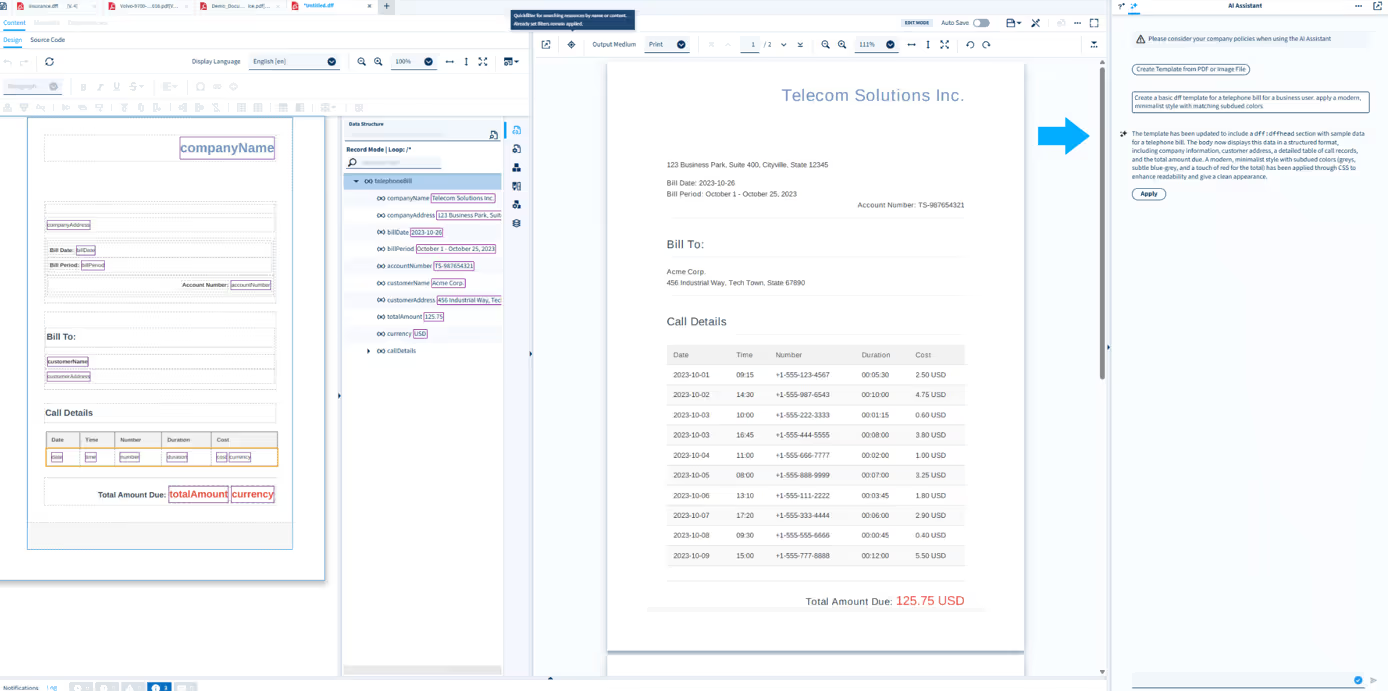
The turbo for your template migration – AI assistant in the DBCS
Companies that want to modernize their Customer Communication Management (CCM) landscape are faced with the central challenge of migrating their often immense existing document libraries. The manual creation of templates based on static formats such as PDF is traditionally a time- and resource-intensive process. Migration projects are becoming an equally costly and time-consuming undertaking; and therefore usually fail in the planning stage.
The new AI Assistant in the DocBridge® Communication Suite (release fall 2025) makes it possible to upload existing documents in PDF format directly into the suite in three simple steps and automatically convert them into editable templates.
- PDF Upload
Cover letters, invoices, insurance policies and more - AI analysis & conversion
Text blocks, graphics, tables - Creation of the template
structured and well-formed 80-90% finished template for further refinement
The introduction of the AI Assistant brings tangible benefits for everyone working with the DocBridge® Communication Suite; or migrate to it.
EAA regulation on “digital accessibility” solution for legally compliant PDF/UA documents
From 2025, the EU's new accessibility law for “digital accessibility” will come into force. The corresponding regulation, the European Accessibility Act (EAA), is already valid today and must be implemented without exception after the defined transition period in summer 2025. Switzerland has also been aware of these requirements for a long time and is following them, particularly at the federal level, in order to provide barrier-free access to documents for people with visual impairments. Since the EAA also includes all electronic commerce documents, it is not only the public sector that is required, but also the private sector. In the area of documents of all kinds (letters, contracts, brochures, invoices, etc.) we are talking about the new “PDF/UA” standard.
What is important is that this new law also applies to all Swiss companies that offer and sell products and services in the EU. And in the event of violations, Swiss companies also have to expect fines of up to 100,000 euros.
The solution for PDF/UA from Compart: DocBridge® Accessibility Designer
The DocBridge® Accessibility Designer is the solution for the automatic conversion of PDF documents into accessible PDF/UA documents (ISO 32000-1 standard), which can be validated and further processed or sent in various ways; no matter which solution was used to create the document. For this purpose, standardized structures are determined in sample documents, categorizations are made and defined as conversion templates. On the one hand, a template defines the tagging rules for each element of a document, and on the other hand, the sensible reading order of the elements that screen readers and other supporting technologies take into account. And thanks to the individually defined set of rules, even large batch runs can be converted.
When creating a document with Compart DocBridge® Impress, the function for creating a rule- and law-compliant PDF/UA is already integrated.
However, the DocBridge® Accessibility Designer can also be used for “on demand” conversions of archive documents in the transition period until 2030. If a user now wants to download a document originally created in PDF/A, the defined elements are recognized, read and a fully tagged, valid PDF/UA document is created. The generated output document can be displayed in the web interface as well as further processed.
Links for further information:
Compart DocBridge® Accessibility Designer
The DocBridge® Accessibility Designer supports you in implementing the EAA regulation; so that your documents become barrier-free. Talk to us early to avoid possible fines.